|
|
 The
Stat Viewer View, sort, print
and plot... The
Stat Viewer View, sort, print
and plot...The
Stat Viewer displays stats for any player, team, opponent or game. Just select any
player from the pull down list. This is by far the best statistic reporting viewer
ever developed. Once you try it you'll be hooked! |
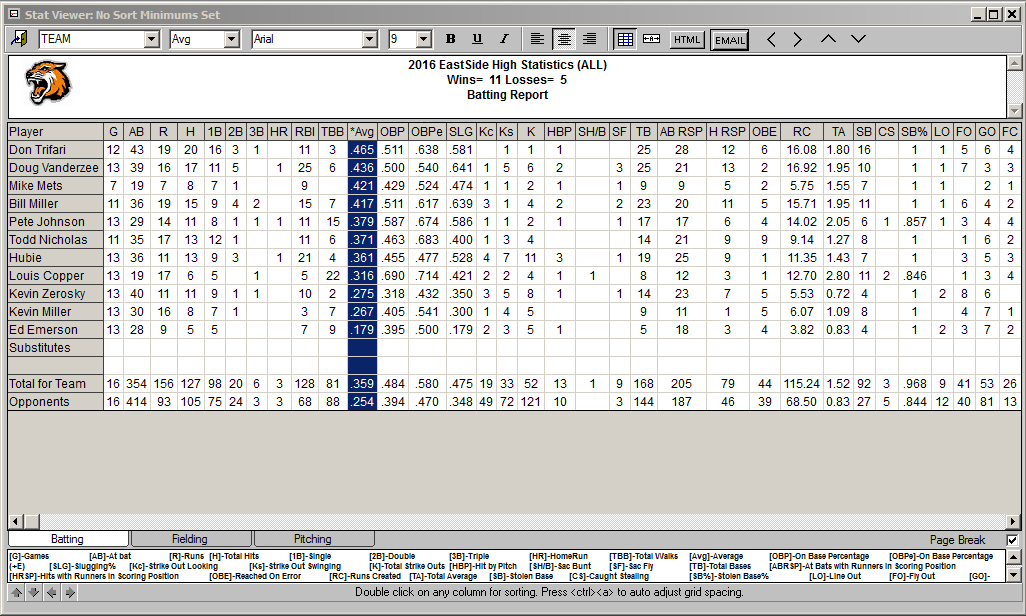
- New stat description key displays all the abbreviations
- Sort by any stat heading simply by double clicking on any column
- View the batting, fielding, or pitching reports by clicking their respective
tabs
- Choose any Windows font style or size from the standard Windows toolbar
- Automatic cell spacing based on font selections
- Move any row or column anywhere you want with just one click
- Export any report to your spreadsheet or word processor
- Create HTML files for posting your team stats on the Web
- Print in portrait or landscape
- Click the plot icon to plot any stat.
- Jump back to the Stat Filter to change game
types or turn stats on/off
- User definable report titles see: Customize
Reports
- User definable stat headings ( AB, BB, etc.) see:
Stat Headings.
- Print statistics in any order see: Set Stat Order
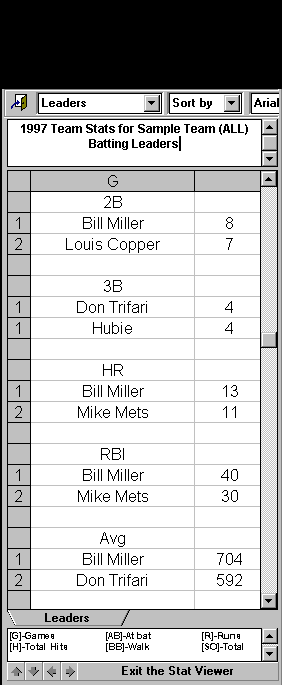
- Turn any report into a leader report with one click. You define the
number of leaders to display for each category. If one or more players are tie, the
report expands automatically
- 8 Different Reports Formats (unlimited combinations)
Sample Leader Report
You can even merge in multiple teams to create league reports or track league
standings. Use the Export feature to create an HTML file. Sample Web
Page Created With TurboStats
Quick Start Users Guide a guide to help
you get started with our trial software
Electronic Order Form
a download is provided immediately after purchase
|
|


