Game Form The
fastest, easiest way to enter game data ... Game Form The
fastest, easiest way to enter game data ...
The Game Form is where you enter and edit all your stats. Create your
schedule or add games after you play. TurboStats stores the batting lineup for each game.
Enter games in 5 minutes or less right from your scorebook by simply clicking on the
data entry scroll bars or typing in the numbers. Import
stats for TurboStats ScoreKeeper, iScore and GameChanger and any
application that creates a MaxPreps output file.
ENTER DATA IN MINUTES FROM SCOREBOOK OR IMPORT
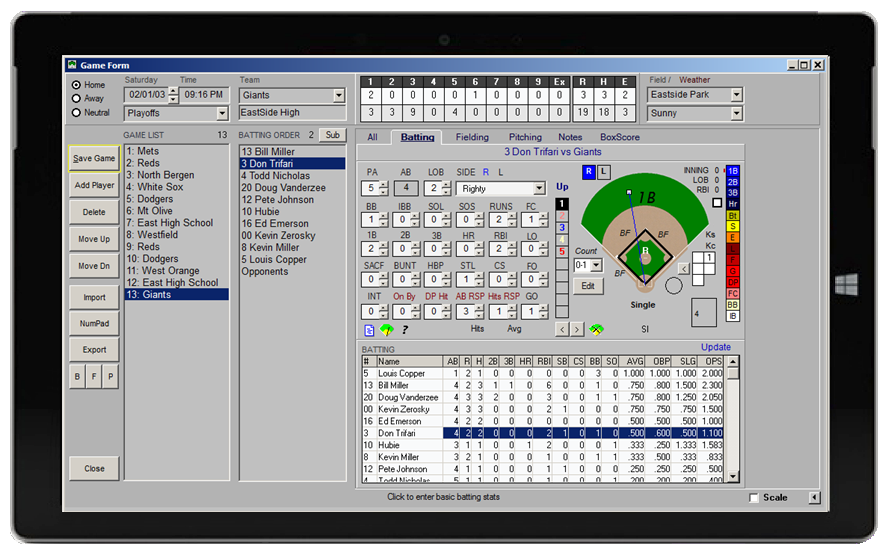
THE ONLY SOFTWARE THAT
TRACKS RIGHTY vs LEFTY BATTING & PITCHING and FIELDING BY EACH
POSITION.
ProSeries allows
tracking of:
- Batting statistics verse right or left handed pitching
- Fielding statistics by each positions (players can play more than one position
per game)
- Pitching verse right or left handed batting
Note: Breakdowns are optional. Entry for "Total Batting", "Total
Fielding" & "Total Pitching" is also allowed.
Additional Features
- Enter Unlimited Games (game by game basis)
- Up to 999 players can bat in any game
- Enter game data directly from your Scorebook in minutes
- Create Unlimited Game Types like Conference,
Non-Conference, Playoffs, Tournaments, etc
- Stat checking automatically looks for data entry errors
- Team totals are automatically calculated after you save each game
- Track the actual game batting order and substitutes
- Box scores for each game
- Track your opponents stats for each game
- Print individual game summaries, multi-game summaries or game schedules
- Track unlimited game notes, weather conditions, and game locations
- Any of the Statistics in red can be renamed (user defined)
- Change game or player data in seconds
- Import game data from ScoreKeeper
app
- Import game box scores from MaxPreps or any app
that exports .max files
- Import statistics from GameChanger or iScore box
scores
- Export stats to MaxPreps
- Optional "GAME MODE" scoring for use during a live game
|