homew.jpg (5559 bytes)


back.jpg (4841 bytes)

basedownload.gif (295 bytes)

mail.jpg (5610 bytes)

TurboStats for Baseball Main Page

Key Features

APP IMPORTERImport Data from iPhone & Android Apps as well as BoxScores from the Web.  

While we feel that the next best device for scoring is not here yet, we want to make it easier for our customers to manage all their data and print the outstanding, fully customized reports they depend on, without having to reenter data manually after the game. With App importing you can score live on whichever device and third party app works best for your program (or your stat keeper) and still get all the basic statistics in the format you need.  It's as simple as Copy and Paste and you can import over 50 stats per player and print NCAA style boxscores and fully customized reports.  Need to prepare individual player reports for multiple seasons? for just conference games? or against select opponents? What about tracking team records, individual game records, and career stats?  TurboStats 15.0 with app importing has everything you need to get the job done fast and gives you full control of your data.

Manage your League
The App Importer allows league managers to import stats from teams using various scoring programs to create team and league leading reports and standings.  There is no need to standardize on one scoring app or manually type in the boxscores.  Just have the team email you a boxscore in HTML format, or just browse to any website with the game boxscore, use COPY and PASTE and the App Importer will load the game or season totals into TurboStats 15.0 in seconds, no more typing in stats.  

Extract your program data from MaxPreps or other Websites
While MaxPreps is a great place for high school coaches to display their data, it's not the place to store your program historical data and records.  If  your team data is on MaxPreps and you have no saved copy, you can use the App Importer to extract all your games and build your entire historical career database just by using Copy and Paste.  You can import each game individually or import the entire season right into your TurboStats career database.

Extract your Opponents Data from MaxPreps and Make Scouting Reports
MaxPreps is a great place for high school coaches to scout their opponents (which is why you may want to wait till the season is over to post it there). Now you can extract the individual game boxscores you need and make customized scouting reports quickly for any combination of teams.  You don't have to settle for an "All Game" summary and you can customize your scouting reports or compare the top conference players to see where your players rank.

Works with TurboStats ScoreKeeper Too!
TurboStats ScoreKeeper has been tested and outperforms the top iPad App almost 2 to 1 (in fewest taps required to score an identical 7 inning game with 11 players per team).  While most apps track less than 50 stats, ScoreKeeper tracks over 300 statistics including full Righty vs Lefty and fielding by positions.  Just because an app shows Righty or Lefty settings does not mean you will be printing Righty vs Lefty stats with these apps.  You can even create advanced pitch type reports by count and location with TurboScout (optional).

Starting At         

3rd Party Applications are sold and supported separately from the Apple/Android Application Stores.  

Apps tested and verified to import include.. i Score, Game Changer, K Force.  Max Preps 

How it Works
Apps that export boxscores in HTML  or TEXT 

  • In the TurboStats Game Form click the new BoxScore Import Icon  
  • Use the option to Email yourself an HTML box score from your App
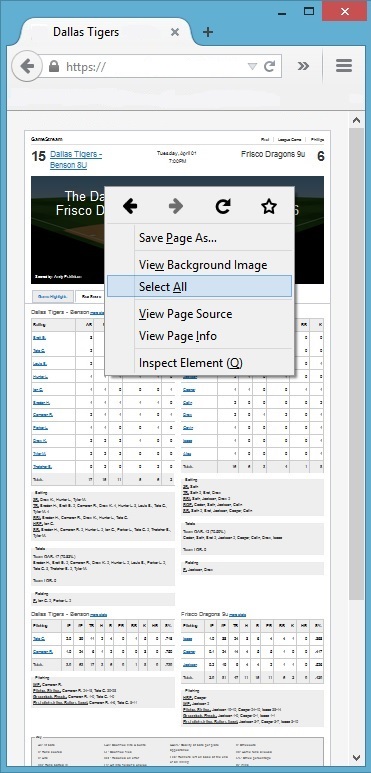
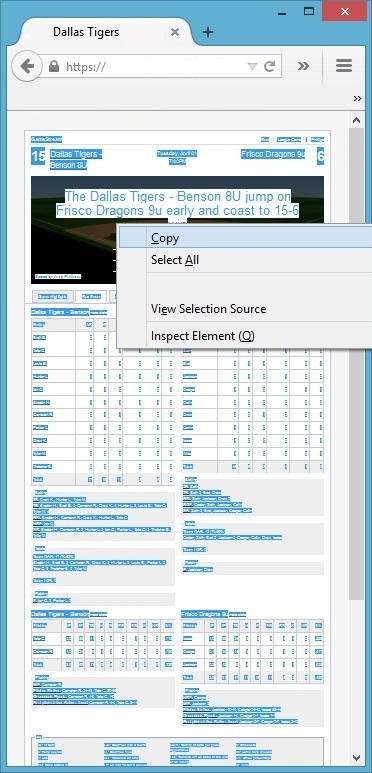
  • Copy the boxscore in HTML from Internet Explorer or your Email software  (Select All>Copy)
  • Press the Paste Button in the App Importer
  • Press Import or Print an NCAA Style Boxscore

for Websites that post box score data like MaxPreps

  • In the TurboStats Game Form click the new BoxScore Import Icon
  • Browse to the game boxscore or season team totals on the web in Internet Explorer
  • Copy the entire webpage with the stats using  (Select All>Copy)
  • Press the Paste Button in the App Importer
  • Press Import or Print an NCAA Style Boxscore

TurboStats is not affiliated with any of the companies that produce Apps.  TurboStats does not support their products, only the importing of boxscore data.  TurboStats App Importer imports data from the standard boxscore that most Apps produce.   A comparison of all statistics imported from each app will be posted shortly.

Palm and Palm OS are among the trademarks of Palm Inc. Apple, iPhone and iPod touch are trademarks of Apple Inc., registered in the United States and other countries.  StyleTap® and the StyleTap logo are trademarks of StyleTap Inc. in Canada, the United States and other countries.  Garnet VM is a registered trademark of ACCESS CO., LTD. and ACCESS Systems Americas, Inc. (formerly PalmSource, Inc.) in Japan and other countries.  MaxPreps is a registered tradmark of CBS.  TurboStats, ScoreKeeper are  registered trademarks of TurboStats Software Company.

Copyright 2011-12 TurboStats Software Company